Pricing Calculator
Everything You Need to Know About Your Store — All in One Place.
- Profit and Loss Calculator
- Profit Margin Calculator
- Markup Calculator
- Break-Even Calculator
- Average Order Value (AOV) Calculator
- Conversion Rate Calculator
- Customer Acquisition Cost Calculator
- Inventory Turnover Calculator
- Reorder Point Calculator
- Cash Flow Calculator
- Marketplace Fee Calculator
- Sales Conversion Rate Calculator
Pricing with Purpose
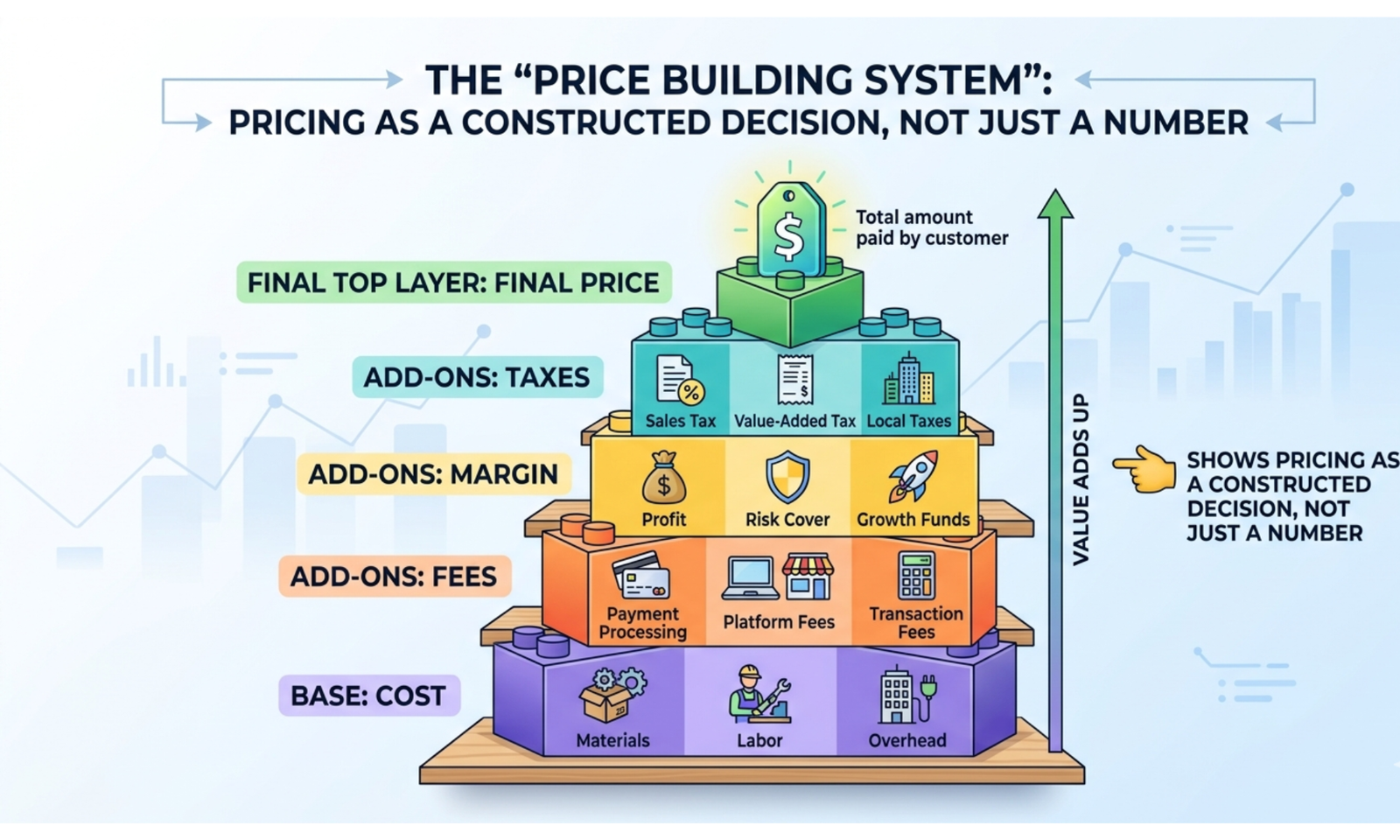
Your prices do more than set revenue, they influence decisions across your entire business. The pricing calculator gives you a clear view of how every price point affects cash flow, inventory, customer behavior, and long-term growth.
This tool makes it possible to:
- See how different pricing choices impact sales, demand, and stock movement
- Plan promotions and product bundles based on real insights
- Project financial outcomes and integrate pricing into your growth strategy
For businesses selling online, in stores, or at larger scale, this calculator turns pricing into a strategic guide. Align your prices with your goals, streamline operations, and uncover new opportunities.
Make pricing more than a number, use the calculator to guide decisions, protect profits, and understand the full story behind each sale.
How to Use This Calculator
- Select Currency – Choose your preferred currency for pricing.
- Enter Base Cost – The cost to produce or purchase a single unit.
- Enter Desired Profit – The profit amount you want to make per unit.
- Enter Discount (%) – Any discount you plan to offer to customers.
- Enter Bundle Quantity – Number of units sold in a bundle (if applicable).
- Enter Competitor Market Price – Optional field to compare your price with the market.
- Click “Calculate Pricing” to see all key pricing results.
What the Results Mean
- Selling Price – Recommended price to achieve your desired profit.
- Profit Margin – Percentage of profit relative to the selling price.
- Discounted Price – Price after applying the specified discount.
- Bundle Price – Total price for multiple units with a bundle discount applied.
- Competitive Price – Price adjusted to stay competitive with market rates.
- Psychological Price – Price rounded to a customer-friendly format (e.g., $9.99).
- Break-even Price – Minimum price required to cover your costs.
Why Knowing Your Pricing Matters
- Ensures each product is priced to achieve target profits.
- Helps you remain competitive in the marketplace.
- Supports strategic discounting for promotions or bulk sales.
- Prevents selling below cost, protecting your margins.
- Simplifies pricing decisions for bundles and multi-unit offers.
A Simple Example
Suppose your product details are:
- Base Cost: $50
- Desired Profit: $20
- Discount: 10%
- Bundle Quantity: 3
- Competitor Market Price: $70
Calculations:
- Selling Price = 50 + 20 = $70
- Profit Margin = (20 ÷ 70) × 100 ≈ 28.57%
- Discounted Price = 70 × (1 − 0.10) = $63
- Bundle Price = (70 × 3) × (1 − 0.05) = $199.50
- Competitive Price = min(70, 70) = $70
- Psychological Price = $70.99
- Break-even Price = $50
This example shows how the calculator helps set competitive and profitable prices for both individual and bundled products.
FAQ On Pricing Calculator
1. How can I determine the optimal selling price for maximum profit?
Enter your total costs (fixed + variable) and desired profit margin. The calculator will show the minimum price needed to achieve your profit target.
2. How can I simulate pricing for different market segments?
Adjust the selling price in the calculator to model customer willingness to pay in various segments and see its impact on revenue and profit.
3. How can I account for discounts and promotions in my pricing?
Input your intended discount or promotion as a percentage reduction. The calculator will show the adjusted price and how it affects your profit margin.
4. How can I evaluate the impact of cost changes on price?
Update the cost inputs to reflect new supplier prices or production costs. The calculator recalculates selling price to maintain the same profit margin.
5. How can I balance competitive pricing and profitability?
Use the calculator to enter competitor pricing data. Adjust your selling price while checking margins to stay competitive without losing profitability.
6. How can I determine break-even pricing for a product?
Set your profit target to zero. The calculator will show the price at which revenue equals total costs, helping identify the break-even point.
7. How can I use it to price bundled products or packages?
Combine the costs of individual items in the bundle. Enter the total cost to calculate a selling price that ensures the desired overall margin.
8. How can I model the effect of taxes or marketplace fees on price?
Add expected taxes or fees to your costs before calculating the price. The calculator shows the selling price required to maintain net profit after all charges.
9. How can I analyze price elasticity using the calculator?
Test multiple price points and compare resulting profit margins. This helps predict how small price changes might affect sales volume and revenue.
10. How can I determine the minimum price I can charge without losing money?
Enter your total costs and set profit margin to zero. The calculator will output the lowest viable selling price.
11. How can I compare multiple pricing strategies quickly?
Input different cost and margin scenarios to generate multiple pricing outcomes and evaluate which strategy maximizes revenue or profit.
12. How can I plan long-term pricing if costs fluctuate?
Use projected cost increases in the calculator to see how future selling prices must adjust to maintain profitability.
13. How can I assess if my price covers all hidden costs?
Include indirect costs such as shipping, handling, and marketing in the calculator. It ensures the final price maintains the desired margin.
14. How can I set dynamic prices for seasonal demand?
Model higher costs or higher desired profit margins during peak seasons. The calculator helps determine prices that optimize revenue when demand is high.
15. How can I ensure consistency in pricing across multiple products?
Enter costs for each product and desired margins to standardize pricing policies while maintaining profitability across your product line.